Showing posts with label facebook. Show all posts

Wednesday, 17 April 2013

Facebook Home And The Promise Of Android

1 comment
Facebook Home And The Promise Of Android


Facebook Home And The Promise Of Android


If you’re an iPhone user, you might be feeling a little left behind, because Facebook launched an application called Facebook Home, touted by CEO Mark Zuckerberg as the “next version of Facebook.” In fact, you might be feeling this way if you’re an Android user, too. For now, only a handful of select devices can even run Home (officially) — notably missing from the lineup is Google’s Nexus 4, the latest in the lineup of Nexus-branded flagship Android phones — devices that users adopt in particular to stay ahead of the curve when it comes to new app releases.

But Facebook promised that more handsets will be supported in time, as will tablets. Well, only Android ones, that is.

It’s too soon to say whether Facebook Home will live up to the company’s claims and expectations of becoming the new way people interact with the social network, or whether it will go down only as a notable experiment on the social network’s part. If the latter, it won’t be a major loss to the company, as Facebook will continue to have access to data from a core group of heavy Facebook enthusiasts. It will learn what keeps users engaged, what posts and images catch their eye and their clicks, and, eventually, which advertisements do, too. But to those who can’t download Facebook Home today because they’re using the “wrong” smartphone, it’s of small comfort to think that perhaps the product won’t ever really be as successful as Facebook promises. Because for users, what matters is not whether this grand roll of the dice pays off for Facebook itself – it’s whether you have the ability to participate in the game in the first place.

This is the challenge of the new mobile landscape.

Unlike the web, where the worst thing developers encountered was IE compatibility – and yes, that was bad – it was only a matter of time (and hair pulling and screaming) and energy to bring a new idea to everyone who had Internet access and a web browser. Because the web is built on open standards, this sort of thing is possible.

Facebook wouldn’t even be Facebook had this not been the case.

But mobile is a different story, and a potentially dangerous one in terms of progress and innovation, as Facebook Home today proves.

On the one side, you have an Android ecosystem that’s fragmented by operating system version. In fact, Google quietly changed the way it discloses that fragmentation. Now, instead of telling the developer community how many phones run Jelly Bean or Gingerbread, for instance, it tells them how many of those devices are used by people who download apps. It’s an attempt to paint a rosier picture of OS distribution patterns by focusing on the app-haves instead of the app have-nots. (Spoiler: there are a lot of people running old versions of Android out there.)

Then on the other side, there’s Apple. Because of its restrictions, Facebook Home will never be able to run as intended on iOS operating systems. That’s not necessarily a bad thing, to be clear. It’s just a statement. Apple deserves plenty of credit for helping technology become an interest of the mainstream – a group that felt its former interfaces, configurations, and command lines too complicated and confusing. Or worse, simply not fun. The iPhone wasn’t the first smartphone, but it radically altered the way that people interact with – and learned to love and care about – technology.

But if we’re giving Apple credit for sparking this trend, lets give them credit for potentially stalling progress here, too.

It’s only a few years into this new paradigm of computing, and things are already starting to feel a little dated. We’ve become accustomed to, bored with, and finally overrun by mobile applications. So the shift ahead of us is enabling new experiences – possibly those that put an app-centric interface secondary. Android is well on its way to enabling this, with its potential for customizations and widgets, as well as the deep hooks that apps can sink into the underlying operating system.

Apps like Facebook Home.

Facebook Home, however, is but the first high-profile example. A niche group Android users have been doing this for years on their own with third-party widgets, launchers, and replacements for core applications.

Android is not an ideal landscape overall. (See: fragmentation issues above. See also: app quality, developer revenue potential, etc.) In other words, this is a not a statement about who wins the larger war, it’s about who wins on this particular battlefront. That said, in terms of enabling a new mobile experience, Android is now more promising than iOS. Of course, you may think that Facebook Home itself is a terrible, horrible thing that you would never consider installing on your own phone, and that’s just fine.

The point is, it’s a different idea. It’s not really an Android launcher, it’s only inspired by them. And even if you have no particular affinity for Facebook itself, you might for the next company that follows it. Because someone will. In fact, one already has: Korean messaging giant KakaoTalk just announced plans for a Facebook Home competitor of its own.

More will come.

And later, it won’t be just about direct copycats like KakaoTalk, or the third-party developers promising DIY “Home-like” experiences, either. Facebook Home’s existence speaks to a world where developers will be prompted to think beyond applications and the isolated experiences they deliver. With the layering, and overall well-designed nature of the Facebook Home feature called “Chat Heads,” we’ve been shown the potential to build entirely different ways of interacting with our devices. Period.

This is the path of innovation. Someone takes a bold step forward with a new idea. Eyebrows are raised, pundits opine, testers review, but ultimately a thing dies or lives in the hands of the everyday users. You.

Facebook Home itself might not make it. It challenges the status quo by making other applications less important than Facebook. That’s a radical enough idea that it could easily fail.

But the damage – whether Facebook Home succeeds or not – is already done. Facebook Home is something else. Wired called it an apperating system. That’s perfect. It exists somewhere between apps and phones. It dug out a whole new space, now begging to be exploited, experimented upon, and filled with new ideas.

And it did this on Android.

Asked if Facebook Home could ever come to iOS, Zuckerberg said, “anything that happens with Apple is going to happen with partnership. Google’s Android is open so we don’t have to work with them.”
Read More

Tuesday, 12 March 2013

HOW FACEBOOK DESIGNED THE NEWSFEED - WITH A PANDA AS INSPIRATION

Leave a Comment
HOW FACEBOOK DESIGNED THE NEWSFEED - WITH A PANDA AS INSPIRATION


HOW FACEBOOK DESIGNED THE NEWSFEED - WITH A PANDA AS INSPIRATION

Robyn Morris, the designer of the new Newsfeed, told MailOnline he has been working on the project for a year.
'When we began we weren't sure what we would be doing,' he admitted.
'One early study used cut up paper to get people to rearrange their newsfeed.
'We found people really want to be able to see just posts from friends, and see photos 
'We decided if we're going to be showing photos, we need to have a design that gave them centre stage.'
The new look was inspired by the firm's mobile apps.
'It starts to feel like mobile and desktop are made of the same material, we don't want people to have to learn things twice.'
Morris also said the firm still treated Facebook as a third party app -even thought the firm owns the retro picture service.
'Instagram remain an independent app - even thought they are in house
It's been really interesting to have them here, to make sure third party apps look good - they are guinea pigs in many ways.
The team behind the redesign was tiny - with Morris and one other designer working with engineers.
'The design team was small - me and one other designer, in fact. 
'It's been a big undertaking, it's a high profile page - and we've had a lot of help.
'We've been bunkered down in a room working closely with engineers - 15 of us in a conference room turned war room.'
'Panda was the mascot - black and white like a newspaper, so somewhere along the way we adopted it - we all call each other pandas.'


Follow us: @MailOnline on Twitter | DailyMail on Facebook 
Read More

Monday, 11 March 2013

Facebook's News Feed: Behind the scenes of site's changes

Leave a Comment
Facebook's News Feed: Behind the scenes of site's changes


Facebook's News Feed: Behind the scenes of site's changes

On Thursday, when Facebook announced the first major redesign of its popular News Feed, the announcement was the culmination of one long year of work by 70 engineers and designers.

Facebook founder and CEO Mark Zuckerberg said, "News Feed is one of the most important services that we build."

Product marketing manager Kate O'Neill has been logging long days trying to get things just right. "News Feed hasn't changed very much since 2006, when it started, and this is just really about making News Feed more enjoyable for people," she said. "We just don't have the option of not moving forward, not modernizing and making the experience better."

At least, that was the message from Facebook members. The social network surveyed hundreds of thousands of users, and many responded with the same request.

Jane Justice Leibrock and her team of researchers also conducted dozens of face to face interviews on the Facebook campus to get feedback from users. "The number one thing that people said they wanted to see was a News Feed that was less cluttered," said Leibrock. "The clutter was this feeling that there was all this different type of news mixed together."

One of the users Leibrock's team met with was Alex Liu. He's been on Facebook since 2004 and says he's "addicted to it".

Liu said his biggest complaint about the social networking site was that he wished "the things that came through on my Facebook feed were just the people that I cared about. I wish I could not see all these different things."

Satisfying heavy users involves a lot of heavy lifting, and that task falls on Facebook's vaunted engineers, like Chris Struhar. "We've been working on this for about a year, working 12-16 hour days just sitting in front of our computers and writing code and throwing together these prototypes," Struhar said.

Zuckerberg and vice president of product Chris Cox were updated weekly, and the final result is a News Feed that takes up a larger part of the screen, with bigger pictures and content, while moving everything else to the side.

"Any time that you have a billion people using a product, and many of those people using it every day, you're going to see a diversity of opinion. We know that change can be difficult for people. We're taking a very measured approach here," O'Neill said.

For Facebook, a measured approach means rolling out the News Feed to only a fraction of its users, which still means that several million people are experiencing what 70 Facebook employees have devoted the last year of their lives to creating.

"It's not a question of huge budgets or lots of people, it's a question of really, really focused effort over a year for a very small group of people that did this design," said O'Neill. "But we're just so glad to be at a place where we can start releasing it to people and seeing how they're using it and how they feel about it."
Read More

Wednesday, 6 March 2013

Facebook’s Providing Free (Or Cheap) Data Around the World—For Facebook Apps

Leave a Comment
Facebook’s Providing Free (Or Cheap) Data Around the World—For Facebook Apps


Facebook has announced that, over the coming months, it will be partnering with 18 network operators in 14 countries to provide users with free or discounted data for some of its mobile apps.  Specifically, it'll let users of Messenger for Android and iOS, and Facebook for Every Phone (the Java app for feature phones), save money on data. Sending messages will either be free, or much cheaper, overseas. So far, Facebook has struck deals with the following carriers:  TMN in Portugal Three in Ireland Airtel and Reliance in India Vivacom in Bulgaria Backcell in Azerbaydzhan Indosat, Smartfren, AXIS and XL Axiata in Indonesia SMART in Philippines DiGi in Malaysia DTAC in Thailand Viva in Bahrain STC in Saudi Arabia Oi in Brazil Etisalat in Egypt Tre in Italy There's currently no news on whether such a deal might roll out in the US—but AT&T is planning some form of "toll-free data" scheme later this year, so something could be in the works. [Facebook via Verge]
Read More

Friday, 1 March 2013

Facebook campus gets the Guggenheim Museum treatment

Leave a Comment
Facebook campus gets the Guggenheim Museum treatment


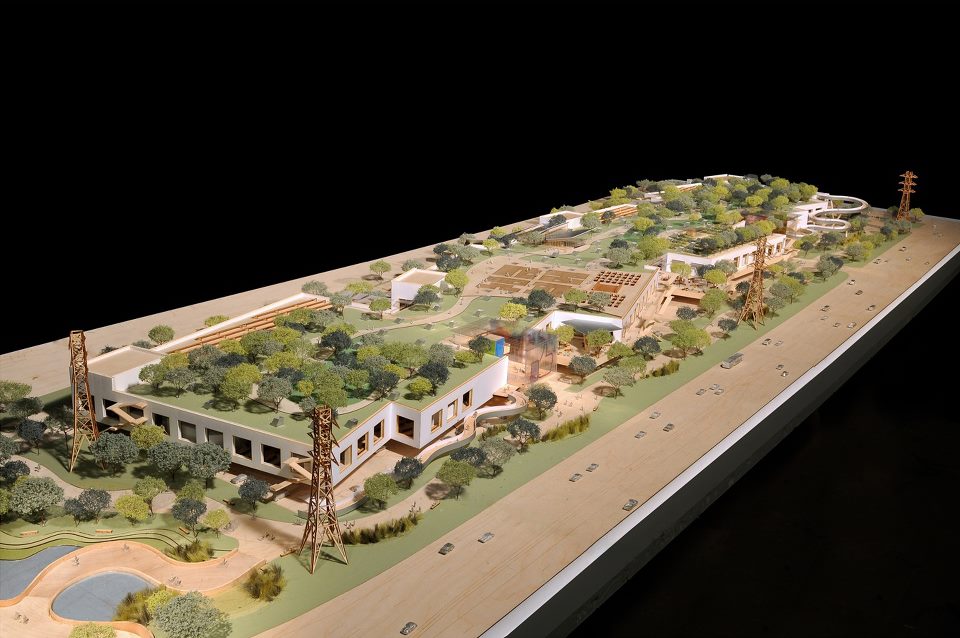
Facebook unveiled its sprawling, rooftop-gardened campus expansion -- the brainchild of renowned architect Frank Gehry.
Gehry, the man behind the famous Guggenheim Museum in Bilbao, Spain, and the more recent, Bilbao-like Walt Disney Concert Hall in Los Angeles, has presented Facebook with a tree-covered campus that boasts eco-friendly construction and an underground tunnel to the current campus.
Everett Katigbak, Facebook's environmental design manager, called the site "a paradise work space for the 3,400 engineers who will one day fill it."
"At every step of planning the new building, Frank has taken into account our engineering culture," Katigbak wrote in a Facebook note posted today. "It will be a large, one room building that somewhat resembles a warehouse. Just like we do now, everyone will sit out in the open with desks that can be quickly shuffled around as teams form and break apart around projects. There will be cafes and lots of microkitchens with snacks so that you never have to go hungry. And we'll fill the building with breakaway spaces with couches and whiteboards to make getting away from your desk easy. "a
Read More

Wednesday, 30 January 2013

'It's About Time'- Facebook Reveals New Search Feature

Leave a Comment
'It's About Time'- Facebook Reveals New Search Feature


Facebook has launched a new feature that will let its users search for more detailed information across the social network. Soon, you'll be able to find the restaurants and TV shows your friends like or see every picture they've taken at the Grand Canyon.

As much as users may like the new features, the company hasn't exactly been a Wall Street darling. So, the new feature may be less about you and me and more about Facebook's bottom line.

"It's about time," Nate Elliott, an analyst at Forrester Research, said about the new feature. "It should have been there all along."


The Two-Way
Facebook Unveils Graph Search, Adding A New 'Pillar' To Services
Elliott said that Facebook users have been frustrated for a while because they were unable to sort through all the content their friends put up. Unless you happen to be online when they posted, chances were good you were going to miss it. He called Facebook's previous search function "one of the worst search experiences online."


All Tech Considered
Why Are Investors In Like With Facebook Again?
Facebook CEO Mark Zuckerberg demonstrated Tuesday what he calls "graph search" at the company's headquarters in Menlo Park, Calif.

He explained how one week he wanted to have a group of friends over to watch Game of Thrones. So, he typed in a query into graph search: "friends near Palo Alto like Game of Thrones." Their names popped up.

"This was great," Zuckerberg said. "I mean I just clicked on a bunch of them, invited them over, and we had a small Dothraki party."

Zuckerberg was joined by Facebook software engineer Lars Rasmussen, who showed off how the new feature can be used to search photos. It can sort them by place, names and even years. Rasmussen typed in a query for photos of his friends before 1990. He laughed as old school photos popped up.

"Suddenly, everyone is a child again," he said.

Facebook's Challenge

While Facebook may be catching up with this new feature, there are also strong economic incentives for getting it out. Analyst Elllott says the road to Facebook is filled with dead and dying social networks. Friendster and MySpace "got boring," Elliot said. People set up their social networks and there was nothing to do.

Elliott said that Facebook's growth is slowing. There's a limit to the number of new users it's going to draw. So, the future he says is keeping people more engaged.

"That's the constant concern for any social network is 'How do we make sure that people have lots of interesting things happening in their friend networks?'"

During the introduction of the new feature, Zuckerberg and his staff constantly referenced user privacy as if they were making a pre-emptive strike. Facebook has been dogged by privacy concerns since its inception. The company was investigated by the Federal Trade Commission and is still under an order that requires it to undergo an independent privacy audit every two years.

Facebook software engineer Tom Stocky explained how you can search for photos of yourself that other people have put up and tagged. He pulled up some photos of himself in a monster costume.

"Let's say for whatever reason I find these photos embarrassing," Stocky said. "Let's say I don't want them to appear in search ... I'd love to have them removed from Facebook altogether."

Stockly clicked on a feature that let him remove the tags and then another feature that let him send a note to the user who posted them, asking to have them taken down.

'Open A Lot Of Users' Eyes'

Debra Aho Williamson, an analyst at eMarketer, said this feature may actually help users really understand how much information they've been sharing.

"That's going to open a lot of users' eyes," she said.

She says she thinks it might actually make people more active in managing their personal information.

Facebook also showed off a partnership with the Microsoft search engine, Bing. If a user searches for a restaurant among their friends and can't find it, Bing will supplement with results from the open Internet.

For now most analysts don't see Facebook's new feature as a direct threat to Google. Williamson says 75 percent of U.S. searches go through Google, which has access to much more information about individuals across the many platforms it owns — Android, Google Docs. Google+ and so forth.

Facebook is rolling out its new feature slowly over the next few months. Although "graph search" is currently only available on desktop computers, Zuckerberg indicated the company is working on making it available on mobile devices. He also emphasized that the new feature is "in Beta." Improvements will be coming.
Read More

Wednesday, 9 January 2013

Setting facebook app as home page

Leave a Comment
Setting Facebook App As Home Page


What you probably have there is a Facebook application with a configured tab page. As the owner or admin of a page you can add whatever tabs you want, and even make them the default tab for visitors who are not already fans or admins of your page.

So here's how to do it:


  1. Create yourself a Facebook application, and make sure to set up a version with a max width of 520px.
  2. In your application settings configure the tab page settings to point at the narrow version of your app.
  3. Go to the Application's profile page, and from the links on the side select 'Add to my page'., select the page you want to add the app to.
  4. In your page settings, set the default tab to the App tab you just added.

Read More

Tuesday, 7 August 2012

How To Disable New Facebook Timeline Feature?

Leave a Comment
Step 1: Login to your Facebook Profile
Step 2: Write “Developer” in top search box and click on Developer App
disable facebook timeline e1316786131262 Heres How To Disable New Facebook Timeline [Guide]
Step 3: Now you see the same screen you saw when you were activating your Facebook Timeline but this you will click “Edit App” instead of “Create New App
disable facebook timeline 1 Heres How To Disable New Facebook Timeline [Guide]
Step 4: After clicking Edit App you will see the same app you build when you enabled Facebook Timeline.
Step 5: On bottom left of your screen there will be an option to “Delete App” click that.
disable facebook timeline 2 Heres How To Disable New Facebook Timeline [Guide]
Step 6: Facebook will now confirm whether you really want to delete this app or not, click Confirm.
disable facebook timeline 3 Heres How To Disable New Facebook Timeline [Guide]
Step 7: After clicking Confirm you will get a confirmation pop-up that your app has successfully been deleted, click “Ok
disable facebook timeline 4 Heres How To Disable New Facebook Timeline [Guide]
Step 8: And that was it, you just disabled Facebook Timeline, go back to your profile and you will see your old Facebook Profile.
Read More

Now You Can Change your Facebook Page URL/Username

Leave a Comment
Now you can change your Fb Page URL (or username) but before you do that, here are few things you need to know:

When you create a Fb Page, the system assigns a random URL to your page that looks like this:

https://www.facebook.com/pages/Sandwich/654321
And when your Facebook Page got likes 25 or  more, you can choose a custom username (or vanity URL) for your Page ,that may looks like this:
Facebook Username

https://www.facebook.com/Sandwich
Once you have claimed the URL (or username) for your Fb Page, there was no option to change it to another. The only workaround was that you delete the old Fb page, thus losing all the likes and re-create a new one with the desired username, provided it is available.


Change Fb Page User_name
Well that old policy seems to have changed recently and Facebook Page owners can now change the usernames  of Pages . To get start, Open any of your Facebook Pages, go to
Edit Page – > Update Info and click the “Change Username” link under the Username option.

Changing your Facebook Username – Things to Know
Before you change the URL/Username, here are few things you should know:
When you pick a new URL for your Facebook Page, the old URL will no longer work ,returns a 404. Therefore, make sure that you update any existing links in your web pages, email signatures, etc. that point to the old Facebook Page URL.
Be very careful when choosing the new URL for your Facebook Page because you are allowed to change the username of any Page only once.
Facebook Pages ignore periods (.) in the URL and they are also case insensitive. Thus facebook.com/sandwich is same as facebook.com/sand.which or even facebook.com/San.Which.
Read More

Facebook Covers To Spice Up Your Facebook Timeline Profile

2 comments
I've been using Facebook since it first started, but until recently never took the time to fancy it up. First thing I tried, after some of my friends recommended it, was to add a 'Facebook cover'.
What is a Facebook cover you may well ask, and more importantly, is adding it complicated? A cover is simply itself, it's a photo, and no it isn't difficult to add one to your timeline at all. It's just a photo which is positioned at the top of your Facebook timeline, up above your profile picture.

Your friends will get so much more out of checking out your timeline once it's adorned with the unique picture you have selected. It not only individualizes your page, but helps people see you in a different light, one which you are able to select for yourself. Facebook themselves actually believe it helps them prevent spam and bogus Facebook profiles, which inflict loads of junky content on Facebook users, and only serve to slow the system and detract from the enjoyable sharing experience which Facebook is meant to be.
There are numerous sites which specialize in Facebook covers, and you can visit one and download one of their pictures easily by following the instructions on the site. Personally I like to vary the photos I use as covers from time to time and do seem to prefer using my own pictures, which reflect whatever mood I'm in at the time. Of course you could use a photo to reflect on a group you're in, or for a worthy cause you support, or just use one of your favorite inspirational scenes. You could also star the photo you use on your timeline as well.
To place a Facebook cover on your timeline:

You need to have a Facebook profile.
Open it up.
Left click your mouse on 'Add a Cover'.
Choose whether you want to upload a new photo, or pick one of your own from a location somewhere on your computer.
When you've decided on a photo, move it around by clicking on it and dragging it up or down, left or right.
Left click on 'Save'.

All done? Now you have your very own Facebook cover and can change it whenever the notion takes you.
Note:

Your cover image has to be at least 720 pixels wide. You can experiment by varying the sizes of the pictures you use; most of the Facebook covers on the download sites I checked are around 8.1 cm x 3 cm, so you could simply adjust one of your own pictures to around that size to get an optimal fit.
Once uploaded, Facebook cover images are public, allowing anyone visiting your Facebook timeline to view them.
Read More

Most Useful Keyboard Shortcuts For Facebook

Leave a Comment
With Web 2.0 came a number of awesome features for web users to do further interact with the web app/website and get the most out of it. One of these features is the use of Keyboard short-cuts that allows users to easily complete the tasks at hand.
Facebook, the great social giant, has a good collection of Keyboard short-cuts that could save you some extra time from reaching out to your mouse for all the clicks.Today, we’ll be covering some of the most awesome keyboard shortcuts that can  make your life easy when using Facebook.So is a list of useful keyboard shortcuts that could really help you save some time.

Google Chrome: 

Alt+M :Send new message,Opens up facebook new message box
Alt+/ :Move Cursor to Search Box
Alt+1 :View Home Page(News Feed)
Alt+2 :View Profile Page
Alt+3 :Accept or Decline Friend Requests
Alt+4 :Open Message Page
Alt+5 :Open Notification Bar
Alt+6 :View Account Settings
Alt+7 :View Privacy Settings
Alt+8 :View Facebook Fan Page
Alt+9 :Read the Facebook Terms of Service Agreement


Firefox:

Shift+Alt+M :Send new message,Opens up Facebook new message box
Shift+Alt+/ :Move Cursor to Search Box
Shift+Alt+1 :View Home Page(News Feed)
Shift+Alt+2 :View Profile Page
Shift+Alt+3 :Accept or Decline Friend Requests
Shift+Alt+4 :Open Message Page
Shift+Alt+5 :Open Notification Bar
Shift+Alt+6 :View Account Settings
Shift+Alt+7 :View Privacy Settings
Shift+Alt+8 :View Facebook Fan Page
Shift+Alt+9 :Read the Facebook Terms of Service Agreement
Read More